The MFA layer you
run yourself.
A sovereign, embeddable multi-factor authentication and action-authorization layer. You host it, you hold the keys, and it never sees a byte of your users’ personal data — integrated into the products you already run, in a day.
A better way to do MFA.
The same job — proving it is really your user, and what they approve — built on the right pillars.
| Ydentifi | The industry default | |
|---|---|---|
| Your users’ data | Never stored — opaque tokens; you stay the controller. | User records and persistent push tokens kept in the vendor’s cloud. |
| Where it runs | Your own infrastructure — any cloud, on-prem, or fully air-gapped. | The vendor’s SaaS; you depend on their uptime and region. |
| Phones home to the vendor | Never — no renewal call, no heartbeat, no telemetry. The running deployment has no code path to Ydentifi at all. | An on-by-default license check-in or telemetry you have to remember to disable. |
| Metadata to Apple / Google | None — no platform push anywhere in the auth path. | Every auth event flows through platform push; metadata leaks with it. |
| What you authenticate | Any action — a signed yes or no over the exact request. | Mostly just the login. |
| Phishing resistance | Signed over the exact on-screen details. | OTP or tap-to-approve — relay- and fatigue-attackable. |
| Device capability | Every response carries the tier the device reached, so your server can tell a secure-element biometric from a passcode. A 2D-camera face unlock is not a hardware-backed biometric and is not reported as one. | A pass is a pass — no signal of whether the biometric was hardware-grade or a look-alike. |
| Keys & cryptography | Non-exportable, bound to the device, post-quantum hybrid. | Shared secrets or server-side keys; classical crypto. |
| Lock-in | Self-hosted, gRPC, open SDKs — your keys, your exit. | Proprietary cloud; migrating out is costly. |
A generalization across the common push- and OTP-based MFA model — no specific vendor implied.
Not an IdP — the layer above it.
Ydentifi is not an identity provider or SSO. It is the multi-factor and action-authorization layer you add to the identity stack you already run — your login, your user directory, your sessions all stay yours. What it changes is how an approval reaches the phone: over a stream the device already holds open, with no Apple or Google push anywhere in the path.
The phone holds a single gRPC stream open to your deployment while the app is active — a channel the device opened, not a push socket registered with a platform.
- 1Your backend→YdentifiAsk for an approval
Your server calls
gRPC · mTLSIssueAuthChallenge— the challenge is bound to the exact action a user is trying to take. - 2Ydentifi→User’s phoneDeliver it down the open stream
The challenge travels over the
no Apple / Google pushSubscribeChallengesstream the device is already holding open. Nothing is handed to Apple Push or Firebase — Ydentifi never learns a push token, because there isn’t one. - 3User’s phone→YdentifiReturn a signed decision
The user approves or denies; the device signs the decision over the exact on-screen details with a hardware-bound key and sends it back via
gRPC · mTLSSubmitChallengeResponse. - 4Ydentifi→Your backendHand back the result
Your server, still waiting on the
gRPC · mTLSAwaitChallengestream, receives the verified yes or no — andauth_strength, the tier the device reached, which can be higher than the one you asked for.
One approval, end to end. Nothing crosses Apple Push or Firebase Cloud Messaging — the challenge rides the stream the device already holds open. (An approval can only arrive while that stream is live.)
Four things, in the box.
Everything you need to run sovereign MFA yourself — and nothing needs external API calls at all. The docs are AI-ready, so your coding assistant can do most of the integration for you.
A server image
A Docker container and a PostgreSQL database — that is the whole deployment. Run it on a single host, or put an L4 load balancer in front only when you want high availability.
A CLI
One command-line tool — pull and run, like the server — to provision, deploy, operate, and simulate the entire system. The CLI is the product surface.
SDKs in 8 languages
Go, Python, TypeScript, Java, .NET, Rust, Ruby and PHP, published at launch — or call the gRPC API directly. Plus native Swift and Kotlin SDKs to build the ceremony into your own app.
The authenticator app
The one Ydentifi authenticator your users install — on the App Store and Google Play at launch, and no per-customer app to build or ship. It stays a blank shell until a user links it to your deployment by QR.
The mechanism, end to end.
From a one-time enrollment to every signed approval — and the sovereign topology it all runs on.
One ceremony, four moves.
Every authentication and every approval follows the same shape. No personal data changes hands, and nothing leaves your infrastructure.
Bind the device
Once per device, a single-use invite ties the user’s device to their opaque identity. No personal data is exchanged.
Ask for proof
When your product hits a sensitive action, your server asks Ydentifi for a challenge carrying the exact on-screen details of that action.
Approve on device
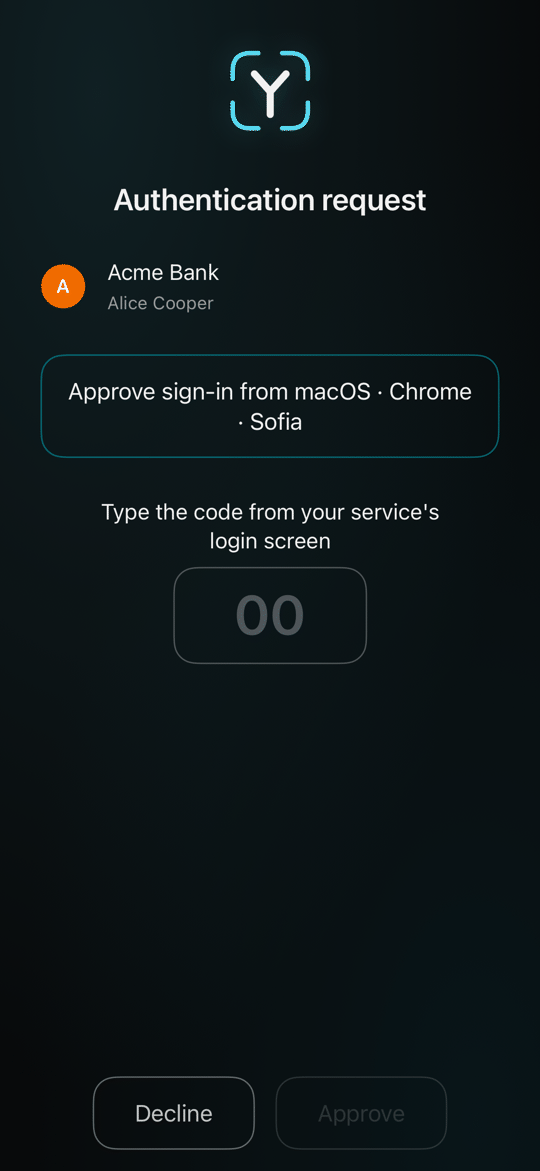
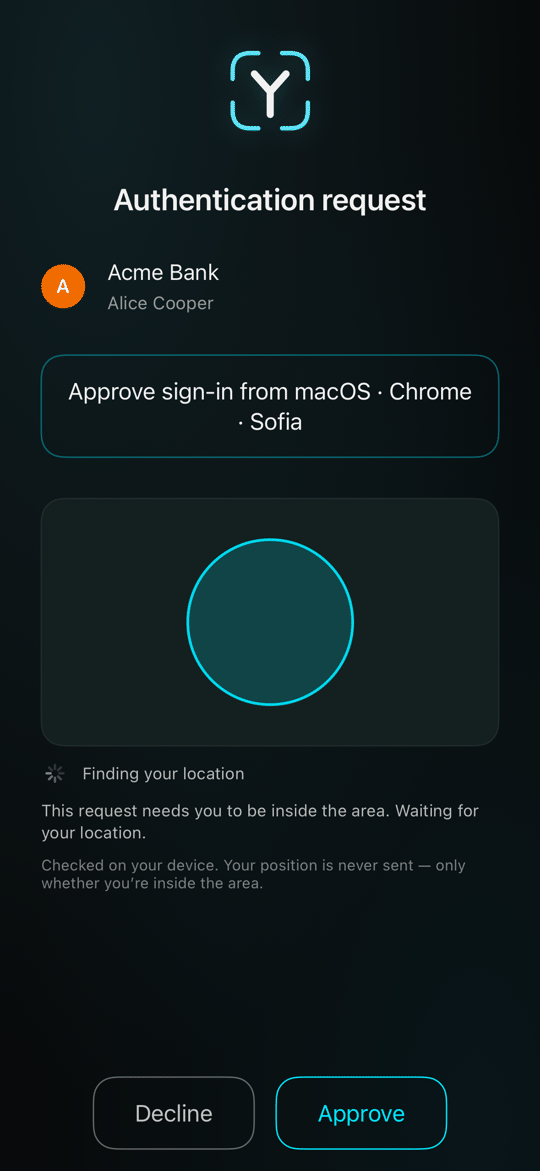
The enrolled device shows those details and signs them with keys that never leave the phone. The user confirms with Face ID or Touch ID, and a location check stands in front where you ask for one.
Check the signature
Ydentifi checks the signature against the key the device enrolled with and streams your server the outcome. If it is an approval, the action proceeds — the decision stays entirely yours.
Because the device signs over the exact details the user sees, a phisher who relays your request cannot change the amount, the destination, or the action — the signature simply will not match. That is what “phishing-resistant” means here, concretely.
Sovereign by design.
Three moving parts, all inside infrastructure you control. There is no Ydentifi cloud in the authentication path.
Your product
Your app, your users, your sessions and interface — unchanged. The SDK adds the ceremony where you choose.
+ Ydentifi SDKYdentifi server
One container and a PostgreSQL database, reachable directly — or behind an L4 (TCP-passthrough) load balancer for high availability. It makes no outbound calls on the auth path.
container · db · optional LBAuthenticator app
Native iOS and Android at launch. Signs each challenge with keys that never leave the phone.
iOS · Android · at launchYour server talks to Ydentifi over gRPC with mutual TLS. Ydentifi streams signed challenges straight to the enrolled device — no Apple or Google push in the path, nothing for a platform vendor to throttle or observe. Everything sits inside infrastructure you own.
Opinions, on purpose.
A few deliberate design choices explain almost everything else about how Ydentifi behaves.
Not a wrapper
Ydentifi is not a thin wrapper around the big-tech incumbents’ identity platforms. It is built from the ground up — richer, more modular, with no requirement or intention for lock-in. Much more akin to a specialist workshop than a hypermarket.
Unopinionated
There is no one-size-fits-all for roles and sessions, so Ydentifi stays unopinionated about them and lets you decide. A nimble microframework that puts you in the driver’s seat.
Fail-closed
Security and integrity take precedence over availability. When something is wrong, the ceremony refuses rather than waving the request through.
Transparent
We favour transparency about what is under the bonnet, so you can make informed choices — down to the exact algorithms and the topology you deploy. It exposes a metrics endpoint and ships a Prometheus + Grafana profile, so what it is doing is visible in your own monitoring.
Host it anywhere — even away from your regulated data.
Because your end users are opaque tokens, a Ydentifi deployment holds no personal data — so it is not bound to the jurisdiction where your GDPR-regulated data must legally reside. Run the authentication layer wherever it is cheapest, fastest, or most convenient; your personal data stays exactly where the law requires it, in systems Ydentifi never touches.
What a request can demand.
Match the friction to the stakes — and authorize actions, not just logins.
Two signed levels, three separate dimensions.
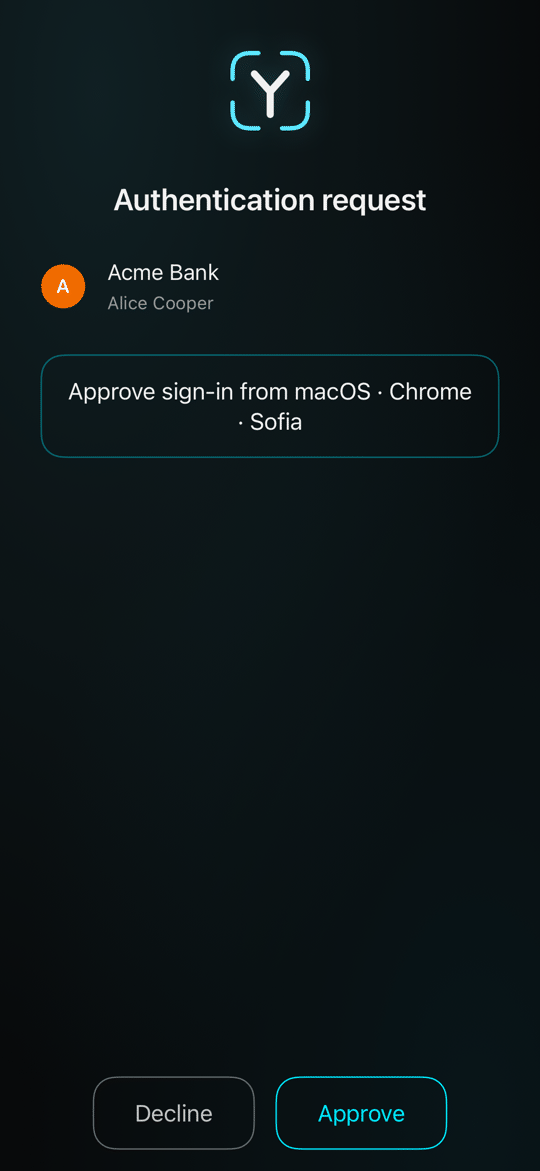
Match the friction to the stakes — a glance for a login, a signed and located approval for a wire transfer. The server owns the policy, and an approval below the level the action asked for is refused.
TOTP works with a third-party authenticator, but issuing the shared secret through the Ydentifi app sends it over the device’s own connection to your deployment instead of printing it in a scannable code.
Not just who — what.
Ydentifi authorizes actions, not just logins — a signed yes or no over a specific thing, with the exact context shown to the user. Add authorization to any important action or workflow:
Adopt it your way.
Partial or full, on your own infrastructure, in the language you already ship.
Two ways in — both stay yours.
Ydentifi is unopinionated about your users, sessions, and interface. Adopt as much or as little as you like; nothing about your existing login has to change.
A step-up where it matters
Drop a single ceremony in front of your highest-stakes actions — a signed approval before a transfer, a deployment, an unlock — and leave the rest of your login exactly as it is.
Your whole second factor
Make Ydentifi the second factor across your product, from enrollment through every sensitive action, with the tier chosen per action by your own policy.
Let your AI do the integration.
The docs, protocol files and SDK examples are written to be read by machines as well as people. Point your coding assistant at them and it wires up most of the work — enrollment, challenges, verification — for you. You review and ship; you don’t sweat the boilerplate.
Would rather not spend the engineering time? We can deploy it for you — on your infrastructure, priced to the complexity of the deployment. You keep the keys.
One CLI, the apps, eight SDKs.
Everything is a command — the CLI is the product surface. There is no GUI-only operation and no console you have to sign into.
# bring the server and its database up locally
$ ydfi deploy local up

# provision a relying party — opaque user IDs, no PII
$ ydfi admin create-rp

# sign a relying party’s mTLS certificate from its CSR
$ ydfi admin provision-rp-cert
// your server asks Ydentifi for a challenge — no PII, just your token
ch, err := client.IssueAuthChallenge(ctx, ydentifi.IssueAuthChallengeRequest{
    OpaqueID:    user.OpaqueID,
    Context:     []byte("Approve €4,200 transfer to ···· 8842"),
    MinStrength: ydentifi.AuthStrengthBiometric,
})
if err != nil {
    // handle error
}
// the enrolled device shows the details and signs them;
// the deployment verifies the signature and streams you the outcome
res, err := client.AwaitChallenge(ctx, ch.ChallengeID)
if err != nil {
    // handle error
}
if res.Status != ydentifi.ChallengeStatusApproved {
    deny() // declined, expired or refused
    return
}
// an approval always meets the level you asked for
grant(res.AuthStrength)
The security model.
Who secures what — and the specific threats the mechanism answers.
What it defends against.
The threats that keep a CSO up at night, and the concrete mechanism that answers each.
| Threat | How Ydentifi answers it |
|---|---|
| Phishing & tampering in transit | The device signs over the exact on-screen details. A relayed request with a changed amount, payee or action breaks the signature. |
| Stolen or leaked backup | Signing keys are hardware-bound and non-exportable. There is nothing in a device backup for malware to lift. |
| Credential reuse & breaches elsewhere | There is no shared secret on the wire and no PII stored. A breach of some other service tells an attacker nothing. |
| Personal-data breach | Ydentifi holds no end-user personal data — there is no honeypot to steal, and no jurisdiction it drags you into. |
| Future quantum computers | Signatures and key exchange are hybrid post-quantum — Ed25519/P-256 paired with ML-DSA-65 — from day one. |
| Vendor lock-in | Self-hosted, gRPC-only, with open client SDKs. Your keys, your data, your infrastructure — portable by design. |
| Push-vendor throttling & surveillance | Challenges stream directly to the device with no Apple or Google push in the path to throttle or observe. |
| A weak or tampered device | Platform attestation proves each phone is genuine, and every approval names the level of check the phone performed. The server owns the policy, so an approval below the level you asked for is refused. |
| A lost device | Re-enroll on a new device; the lost device’s key is revoked and can no longer sign. |
On passwords & devices.
Passwords aren’t the enemy — how we use them is. You may read our view here → And if you’re weighing passkeys: they fix login, we authorize the action past it — On passkeys →
The design in depth: MFA without Apple or Google push → · Transaction signing and dynamic linking → · Post-quantum MFA →
Evaluate everything before you talk to anyone.
The API reference, the typed error catalogue, the rate-limit numbers, the load-balancer matrix, and the price are all public — and a local deployment runs in an afternoon. There is no demo to request between you and a verdict. See exactly what you can check →